How To: Use A Wii Classic Controller To Play Dead Trigger [No Root][Update]

How To: Use A Wii Classic Controller To Play Dead Trigger [No Root][Update]
[Update: Currently the WiiMote App cannot connect to devices running Android 4.2 but the developer is looking into a fix.]

My biggest gripe with trying to play console quality games on a mobile device has to do with on-screen controls. No matter how accustomed to them I become, they just don’t offer the same precision and/or experience as do physical controllers. I find playing FPS games with on-screen controls to be close to unbearable. Maybe I’m just old school, but give me a controller over onscreen controls any day.

One game I’ve been playing a lot of recently is Dead Trigger. I’ve seen various methods for hooking up a PS3 DualShock 3 controller to use with Dead Trigger but I was put off by the fact that you need to root your device in order to use the DualShock 3 wirelessly. Sure, you can use an OTG cable, but I hate the limitations involved with having to be wired into your device via a cable. Plus, if you don’t already own a PS3 DualShock 3 controller, you’re going to have to buy one and they’re pretty expensive.

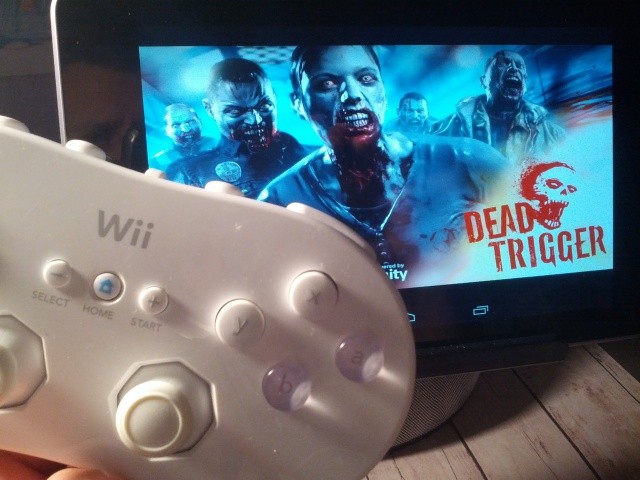
I often game on my Android devices using a Nintendo Wii Remote and wondered if it’d be possible to use a peripheral such as the Wii Classic Controller to play a game such as Dead Trigger, without needing to root my device. Sure enough, it is possible, and after painstakingly figuring out the right control mappings, it works even better than I expected.

This was good news for me, since I already had the Wii Remote and Wii Classic Controller, I was now able to play Dead Trigger using a controller that didn’t need to be plugged into my device and didn’t require a rooted device. That’s a win in my book.

Since it was kind of a pain to figure out the mapping schematics (and I still don’t have a full set), I figured I’d show you guys how I did it and provide you with a list of control functions so that you can easily do this yourself.

Now don’t be shy when it comes to experimenting with other games as well, I’ve used this method with a few tweaks to play ShadowGun and other FPS games as well.

What you’ll need:

Step 1

How To: Use A Wii Classic Controller To Play Dead Trigger [No Root][Update]

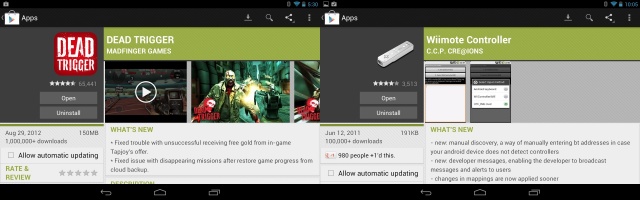
Download and install both the game Dead Trigger and the app Wiimote Controller from the Google Play Store.

Step 2

How To: Use A Wii Classic Controller To Play Dead Trigger [No Root][Update]

Now it’s time to pair and set up your Wii Remote to the Wiimote application. The first thing you are going to want to do is turn on Bluetooth. Once Bluetooth is on, open up the Wiimote application you downloaded earlier. Click on #1: Init and Connect and then press the #1 and #2 buttons on your Wii Remote. The Wiimote app will search for your Wii Remote and connect to it. If it was successful, you will see it say:

Connect to 1 wiimotes.
Setting LEDs…
Done…
Polling button data…

How To: Use A Wii Classic Controller To Play Dead Trigger [No Root][Update]

Once your Wii Remote is connected, choose #2: Select WiiControllerIME and then choose WiiControllerIME.

After you do that, go into the Wiimote settings by clicking on the menu icon (3 dots) and then choose Preferences and make sure to check the box next to Switch after disconnect. This will ensure your keyboard is switched back to the Android keyboard after you have disconnected the Wii Remote (simply turn off Bluetooth to disconnect the Wii Remote).

Step 3
How To: Use A Wii Classic Controller To Play Dead Trigger [No Root][Update]

Now it’s time to map out the controls for Dead Trigger. I’ll give you a list of corresponding game commands for your Wii Classic Controller and from there you can assign them to whichever buttons you wish. For instructional purposes I’ll be using the setup I created, but feel free to map your setup however you’d like.

List of known Dead Trigger game functions:

Movement

  • Move Forward: D-pad up/XP D-pad up
  • Move Backward: D-pad down/XP D-pad down
  • Move Left: D-pad left/XP D-pad left
  • Move Right: D-pad right/XP D-pad right

Aiming

  • Aim Up: I
  • Aim Down: K
  • Aim Left: J
  • Aim Right: L

Other

  • Fire/Shoot: Number 8
  • Reload: Number 7
  • Zoom In/Scope: Number 6
  • Switch Weapon: A
  • Item Slot 1: Number 3
  • Item Slot 2: Number 1
  • Pause/Menu: Back XPO
  • Text 1 (changes in-game font): Numpad 7
  • Text 2 (changes in-game font): Numpad 8

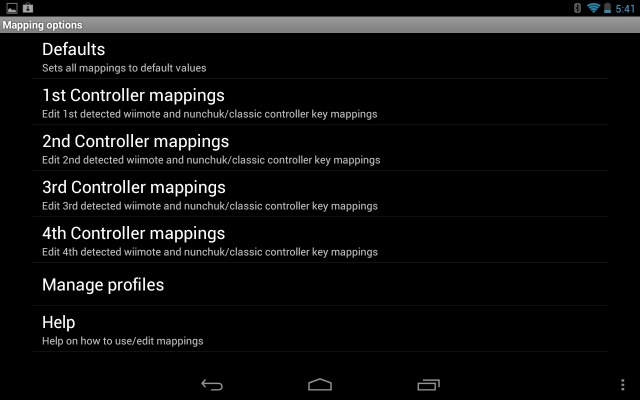
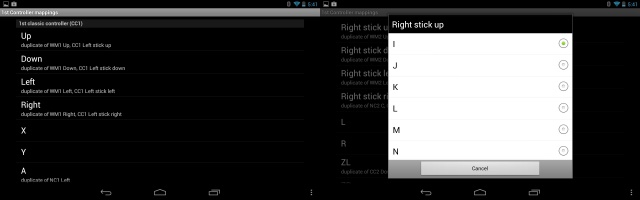
To assign a function to a button on the Wii Classic Controller, first click on the Menu button (3 dots) from within the Wiimote Controller app and then select Preferences > Mapping options > 1st Controller mappings (or whichever one you want) and then scroll down to the 1st classic controller (CC1) section.
How To: Use A Wii Classic Controller To Play Dead Trigger [No Root][Update]

From there, simply select the Classic Controller button you wish to assign a function to and then choose the function (see Dead Trigger function list above). You can also save your setup under Save as profile (name it Dead Trigger). Then whenever you play Dead Trigger, simply load up that profile and you’ll be good to go.

My Setup
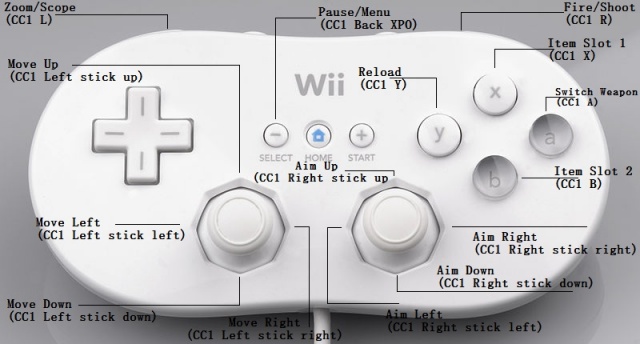
How To: Use A Wii Classic Controller To Play Dead Trigger [No Root][Update]

This is how the mapping on my setup would look in the Classic Controller settings:

  • (CC1)Left stick up: D-pad up/XP D-pad up
  • (CC1)Left stick down: D-pad down/XP D-pad down
  • (CC1)Left stick Left: D-pad left/XP D-pad left
  • (CC1)Left stick right: D-pad right/XP D-pad right
  • (CC1)Right stick up: I
  • (CC1)Right stick down: K
  • (CC1)Right stick left: J
  • (CC1)Right stick right: L
  • (CC1)R: Number 8
  • (CC1)L: Number 6
  • (CC1)Y: Number 7
  • (CC1)A: A
  • (CC1)X: Number 3
  • (CC1)B: Number 1
  • (CC1)Select/-: Back XPO

Step 4

Launch Dead Trigger and let the bodies hit the floor! See it in action below.

Feel free to contact me with any questions and I’ll do my best to get you set up. Cheers!

Apps you might like

  • http://www.facebook.com/austin.schulz.90 Austin Schulz

    Okay i followed all the instructions but it asks me for a code to pair with bluetooth. What is that code? I have a transformer pad tf300.

    • VinMessina

      You should only need to toggle on Bluetooth. No need to pair anything via your tablet. You will connect to the Wii Remote via the Wiimote application. Is the application asking for a code or is your tablet asking for the code within Bluetooth settings?

  • http://www.facebook.com/greg.luna.3 Greg Luna

    Hi i just wanted to thank you for this tutorial. I have been looking for something like this for quite some time and I’m glad i happened across your article. I didn’t have the luxury of owning a PS3 controller but i do own a Wii so i was hoping someone would have figured out how to use a wiimote and classic controller to play this app. I used the set up your gave and it worked perfectly with my nook color running CM 7.2 RC. Thanks again and keep up the excellent work!

  • http://www.facebook.com/mcanaveral625 Marc Canaveral

    does it work with the asus transformer prime?

  • butterfist

    thanks, I’ve been able to configure my controller, I’m actually more comfortable with the on screen controls… maybe with other games it may be usefull

  • steve30x

    Man miss doing this on my games but this app does not work with HTC at all but it did with Motorola and others.. :(

  • http://www.facebook.com/mcanaveral625 Marc Canaveral

    what do you have your sensitivity set as? i cant get head shots as fast as i use to.

  • Greg Rekounas

    Set this up on my Acer A500 Tablet and had no issues. I will try it on the S3 as well.

  • Quanno

    Very nice work, it works fluently! I’m wondering, how did you find the keymappings? Did you randomly try out every key available and hope you got the right one? I’m trying to set this up for more FPS games but I haven’t been able to figure out how.

  • Michael

    Do I need two controllers? Please someonex ink me to the controllers I need to get.

    • VinMessina

      You need a Wii Remote and a Wii Classic Controller. The Classic Controller plugs into the Wii Remote.

      • Michael

        Can you link me yo pictures of the both controllers I need. Also link to where I can buy them. thank you.

  • http://twitter.com/rdlf2048 Rodolfo Ferreira

    Excellent article! Now, did you manage to make this to work with Shadowgun: Deadzone? I’m still playing around with the key map set up but I just managed to get my left (walk) and right (look around) analog sticks to work with the game. That’s it. No shooting, reloading, running, switching weapons, nothing. Maybe Madfinger chenged the buttons scheme or I might be missing something there. It’s strange because with the same key map I played the first version of Shadowgun without any problem. Anyone?

    • VinMessina

      Haven’t tried it on Shadowgun: Deadzone but like you said, it worked with the original Shadowgun (which I have used it on).so it’s weird that they would have switched it for Deadzone.

      • http://twitter.com/rdlf2048 Rodolfo Ferreira

        I don’t think it is. You know why? This game is cross-platform and that means crApple users gotta play it as well, unfortunately. Due to the closed nature of crapple’s OS, not every controller is compatible with their shitty products, whereas on Android you can get anything to work. So that means crapple users are stuck with touch screen gameplay so Madfinger thought it’d not be fair to let Android users play with controller, while crapple gamers are playing with touch controls, so they tweaked the game and disbled the buttons function; That’s why when you connect your controller, only the analog sticks do work.

        • http://www.facebook.com/aqil.subahan Aqil CpuKnight Subahan

          Haha not true dude.I’ve been kickin’ ass with the wired Xbox 360 controller and it works perfect.Dont even have to manually map.Haha funny owning all those newbs using touch controls :D

          • http://twitter.com/rdlf2048 Rodolfo Ferreira

            For real? What tablet are you using?? Which XBox controller did you buy? I bought the console edition, it comes with an adapter from console to USB output. I don`t know what`s the reason it won`t work, but my guess is Asus messed up with the vendors_list when it released ICS for the Old Gen. Transformer 101. As far as I know, you have to root your device in order to edit the vendors_list and include Microsoft in it, reboot your Android tablet and then it will work flawlessly. That is for the Xoom. In my case, if you plug the XBox controller into a USB port from the dock, the tablet itself will not recognize it, then nothing happens. However, I bought USB/BT Joystick Center 6 to give it a try and installed it on my TF101 and when my controller is connected to the dock, it DOES recognize my XBox wired controller. So what explains the fact that a software will recognize my controller, but my tablet won’t?
            Anyway, I just didn’t want to root my TF101 just to edit a single file, but it seems there is no other alternative…have waited for an update from Asus expecting they did things right this time but all they do is release JB for other Transformer series. I guess they don’t give a f…

    • fabian

      Hey idk if you check this or not but I got the mappings for the game and it works flawlessly I’m using galaxy note 2 with wii remote and classic controller pro to play. I just updated shadowgun and all of a sudden all the buttons worked.

  • http://www.facebook.com/alexandre.gareau.9 Alexandre Gareau

    I’ve got some problem with the key mapping in Dead Trigger…
    I follow everything you said and map the key to the right button on my classic controller, but only the left stick work.
    Do they changed the key mapping or it’s my tablet (Acer Iconia a100) that mess the control?

  • kris

    everything is working perfectly, except zoom and shoot buttons are not working. plz help!!!

About the author

Vincent MessinaVincent Messina has been writing and evangelizing about Android for the past three years. When he's not playing the part of "Loki" to his 5 and 4-year-old, he can be found here, covering all things Android. He adamantly believes Android has the greatest community around and can be harassed at any of the following locations: Google+, Twitter.

email hidden; JavaScript is required| Read more posts by .

Posted in Accessories, Apps, Featured stories, Hardware, How-To, News, Software, Top stories | Tagged: , , , , , , , , , |


scribol