
Ditch Those Crappy Video Subscription Services And Grab Yourself A Slingbox SOLO [Review]

Ditch Those Crappy Video Subscription Services And Grab Yourself A Slingbox SOLO [Review]
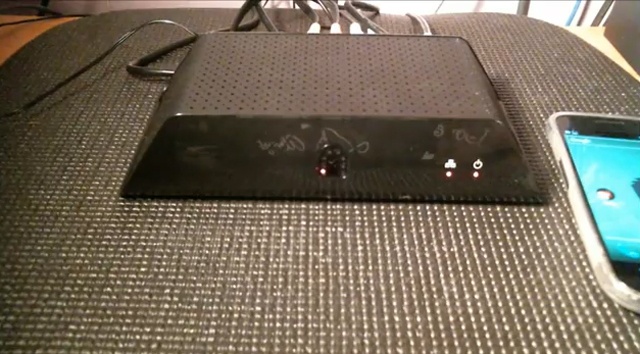
The unfortunate reality of trying to replace cable with video subscription services such as Netflix or Hulu is that, well… they kind of suck. Okay, so that’s my opinion and it’s completely possible that you’re happy with the Walmart bargain bin selection of movies Netflix has to offer, or being last to find out that The Island was just purgatory and the whole point of LOST was, well… pointless. There’s many reasons why I’ve been unable to cut cable out of my life, and if I’m going to be paying for it every month — I might as well get my money’s worth. That’s where the Slingbox SOLO comes in.

Sling Media and their Slingboxes have actually been around for quite some time, and in my opinion, remain the best solution for watching TV while on-the-go. If you haven’t heard of a Slingbox, it’s a TV streaming media device (although it can stream much more than TV) that allows you to watch and control your cable or satellite service via an internet or mobile connection.

I’ll be showing you a Slingbox SOLO which is the cheaper of the two Slingboxes offered by Sling Media and costs anywhere between $149 to $200 — depending on where you purchase it. While the Slingbox SOLO only offers a Standard Definition viewing experience, it gets the job done, and does it quite well. Anyone interested in the HD Pro model can expect to pay upwards of $300, but if you can swing the cash, it definitely has its advantages over the SOLO.

The Slingbox SOLO comes with:

  • AC adapter (100-240V, 50-60Hz)
  • Ethernet cable
  • Quick Start Guide
  • Composite A/V cable
  • Remote control IR cable

Setting up the Slingbox is fairly easy and requires that you:

  1. Connect your TV or video source to the Slingbox.
  2. Attach the remote control IR cable so you can control your TV from your computer or mobile device.
  3. Connect the Slingbox to your network router.
  4. Connect the Slingbox to a power outlet.
  5. Configure your Slingbox at www.slingbox.com/getstarted. If you wish to watch on a smartphone, install the SlingPlayer software on your compatible smartphone. To watch on a connected device such as a TV, you need a Boxee Box.

Once you have everything set up, you can begin watching your TV at www.slingbox.com or by using the SlingPlayer app for your mobile device. The SlingPlayer app costs $29.99 in both the Google Play and App Store. It may very well be the most expensive app you’ll purchase, but it’s worth it to have your full cable channel lineup available to you wherever you go.

The viewing experience online via a computer is the most optimal of the two and gives you a larger screen view than with a mobile device. I experienced no lag and a quality picture over a broadband connection via Comcast. Viewing on my mobile device was great due to mobility and the picture quality was good enough to enjoy what I was watching. The SlingPlayer app takes a little getting used to and using the on screen controls can cause a bit of a lag. Other than that, streaming was smooth over WiFi and 4G, not so much over 3G.

If you simply can’t get away from cable, the Slingbox SOLO and SlingPlayer app will allow you to take all of your on-demand and cable content along with you when you can’t be at home. You’ll never miss a game or finale as long as you have an internet or mobile connection, and sometimes you just need to experience a media moment as it’s happening — not days, weeks, or even months later.

Product: Slingbox SOLO, SlingPlayer App (Android, iOS)

Price: $149 to $200 (Slingbox SOLO), $29.99 (SlingPlayer App)

Pros: The Slingbox looks sleek and compliments any home entertainment center, it’s fairly easy to set up and gives you access to all of the TV content you already subscribe to. Viewing quality is more than sufficient over WiFi and having your cable box in the palm of your hands is simply priceless.

Cons: The Slingbox and SlingPlayer are a bit pricier than I would like. You’ll also have to purchase a separate app for both your phone and tablet which is absolutely ridiculous at $30 a pop. Customer service is non-existent unless you pay extra, and viewing quality over 3G or limited areas can be a frustrating experience.

Verdict: If you already have a cable subscription, this is a kick-ass combo that will give you what others crave: live television in the palm of your hand. Even if your goal is to cut cable out of your life, the Slingbox can make for a great relay to a security camera or other video monitoring device. All-in-all, an investment I’m more than pleased with.

For a hands on look at the Slingbox SOLO and SlingPlayer app for Android, check out the semi-lengthy video below. Cheers!

Apps you might like

  • peteywheats

    All this Android crap is pissing off this long time mac cultist. Sell out if you want, but I’m not with it.

    • wsuraiders3910

      Peteywheats no one cares what you think.

  • http://www.facebook.com/sorenhedberg Soren Hedberg

    Slingboxes are great, until the power supply dies and the Slingbox store is sold out and they don’t respond to emails or tweets. All this AFTER I purchased the $30 app for my iPhone… and then paid ANOTHER $30 for the iPad app.

    I would not recommend this product to ANYONE. 0 stars out of 10.

    • buccaneeral black

      Happened to me. But I went to Wally World, bought a universal adapter for less than $20 and only missed a day of Sling. 

  • mainvision

    I’ve had a Pro since at a couple of years – waste of money and space. It does have three inputs – but they are dedicated to one single function each: a tuner, a composite input and some sort of HDMI input for the HD signal. It’s not really HDMI: you connect your HDMI cable to a large dongle, which separates the signal into YUV, if I recall correctly. Huge mess of cables behind the unit, of course.
    The TV tuner loses its memory regularly, so requires lengthy retuning. Can’t move around the channels, which means that either you memorise the number of the channels you regularly watch, or you just search through them, one at a time – a slow process. Once you’ve set up your Slingbox, you can start watching TV remotely – until it crashes. And when it crashes, you have to do a hard reset by pulling the plug of the unit, so it’s impossible to do remotely. Yes, I’ve updated the firmware when a new version is available – which is very rare. And Slingbox haven’t had a new product in years, except for a combined satellite tuner with Slingbox capabilities several months ago – so it looks like the company is not going anywhere. I have 20 Mb/s at home and variable rates at remote locations – and the signal, when the unit doesn’t crash, is pretty mediocre – can’t even dream of HD quality.
    Concusion: worst way of throwing away a few hundred bucks, with frustration guaranteed. And most decent Linux based satellite tuners are capable of remote video streaming either out of the box or after installing a few free hacks, so why bother with Slingbox?

  • djrobsd

    You have to buy the hardware for $200-300 and pay $30 bucks for the APP?  PASS!!!! Wow, I really wonder sometimes about the folks who write for this site… And by the way, I cut the cord on my cable 2 years ago and never looked back.  For those who want to know how just google nzbmatrix & sickbeard. :)  Gotta be a hacker though, so may not work for those ease of use mac folks. :)  

    • herbaled

      What does the price of Slingbox have to do with CoM’s writers? Don’t shoot the messenger. 

      • http://twitter.com/rbxcube Rubix

        Yeah. Heaven forbid people write about a product they like just because it costs something.

        Now I’m gonna go log in to my Linux box and pretend that I’m a hacker because I don’t want an “ease of use” Mac.

  • Steve S

    One word…VULKANO!!  Believe me, I’ve tried all of the boxes, and even a Hauppuage tuner card with a new program that serves up a feed you can grab with iphone/ipad.  Struggled with that, then went looking for a standalone solution.  Slingbox is expensive, that’s the biggest deterrent, and then like you say another $30 for each device you want to view it on…CRAP!

    Check out the Vulkano Flow (other higher priced boxes with more DVR functionality).  Awesome box.  Just like a Slingbox, but only costs $80 on sale ($99 otherwise), and their app is $12.  Quality is night and day different.  Mainly because the Flow takes component input.  On my ipad it streams at near 4,000 Kbps and looks unreal.  Basically an HD feed to my ipad while on wifi.  The picture is night and day from anything I’ve seen streaming live.  Does the same streaming over 3G too when outside the home.  Simple interface.  Biggest downside is the EPG, other than that it just works.  I wish the reviewer would’ve done a side by side comparison.  The component input and the cheaper price make it a no brainer for me. 

    Again, not an employee, just stumbled on the Vulkano Flow and had to tell about it when seeing a review for an inferior and more expensive product. 

    • http://www.facebook.com/people/Bobby-Autrey/1439557375 Bobby Autrey

      I am with you. I found it by accident on clearance at Fry’s and love it. It’s far more stable than the Slingbox HD I owned and my iPad and iPhone apps were free. I would highly recommend it over Sling. I use it on my MacBook, iPad and iPhone and it’s very solid on all three. 

  • http://twitter.com/bwhite1234 bwhite

    Avoid Sling.  Technically their products work, right up until they decide they need to make more money by selling you the latest hardware and they “upgrade” their apps to prevent you from connecting to your still working hardware.  I have two Slingbox Classic – nothing wrong with them, except that Sling wants to make money by forcing me to upgrade to the Solo you mention.  Now I have a Slingbox HD but I know it is just a matter of time before the next gen hardware comes out and they block me from accessing my Sling HD unless I pay to buy the latest hardware. 

    They also have very poor Mac support.  While the old Mac app still works, it will not receive HD from the Slingbox HD.  You have to use their big-brother infused web browser plug in on a Mac to receive HD from their flagship product.  That is until Firefox releases an update and the Sling plug-in is once again incompatible.   

    Sling is sad example of a company that had a great technical solution ruined by greed and an eagerness to throw existing customers under the upgrade bus. 

    It will just be a matter of time before the Solo you promote here will be rendered obsolete by an app upgrade soon after they release the next generation of hardware.

  • Alfiejr

    well, i don’t get all these hate posts. and some fact checking would help too. i’ve had the HD for 3 years now, and it still works great. it does in fact have component inputs, which i connect to my TIVO (while using the TIVO’s HDMI output for the TV – yes both will output at the same time). you can buy one at Amazon today for $256 (i just checked). i get a very good some-kind-of-HD picture via 3G streaming – it is quite apparent SlingMedia has been improving its streaming technology since i first got it. they have even replicated the TIVO remote control exactly now.

    this makes total sense for me since i use it for CATV ‘slinging’ to my city apartment (workweek) from my house, thus avoiding paying for two cable services at $1000 each per year. i run it on my iPad and watch on my TV via AirPlay/Apple TV.

    but even without that purpose it is great. i’ve watched a football playoff game on my iPad 2 while riding down the freeway – worked fine. i use it all the time while traveling. and at home i watch TV on my iMac while doing something else via the Slingbox web site. i can even watch at work on my workstation – on break of course.

    yes, the early software was buggy and a pain to set up, but that is history now. and yes, SlingMedia did abandon its first gen hardware, burning early adopters. well, water under the bridge, and that doesn’t matter now.

    when it comes time to replace the Slingbox or TIVO someday, i’ll check out the Vulkano, which wasn’t around 3 years ago.

  • http://twitter.com/bnjmntrb ben traub

    you lost me at “Connect the Slingbox to your network router.”
    hulu & netflix wirelessly to my ps3, roku, etc….not to mention another round of “we’ve noticed some copyrighted materials going through our tubes to your house” emails making their way around.

    maybe in time, but not now.

  • eriksuperman

    At this point, I’m not happy with Netflix, Hulu OR
    Walmart.  Really Walmart ?  Are you kidding me?  That’s like a
    ghetto version of Netflix’s DVD revamp.  I have Dish now, and they offer
    the Sling Adapter for a LOT cheaper than
    anywhere else.  I saved about a hundred bucks with this, and with the free
    Dish remote Access app I can take my live TV and DVR practically anywhere I
    go.  I love having something in the car to entertain the kids with, and
    since I can watch or set my DVR on the go, my wife doesn’t get to nag me for forgetting
    to set it in the morning.  A few Dish coworkers showed me how to use it,
    and it is so simple.  Just turn on the tablet or phone and watch like I’m
    at home.

About the author

Vincent MessinaVincent Messina has been writing and evangelizing about Android for the past three years. When he's not playing the part of "Loki" to his 5 and 4-year-old, he can be found here, covering all things Android. He adamantly believes Android has the greatest community around and can be harassed at any of the following locations: Google+, Twitter.

email hidden; JavaScript is required| Read more posts by .

Posted in Android, Featured stories, Reviews | Tagged: , , , , , , , , , , , |


scribol