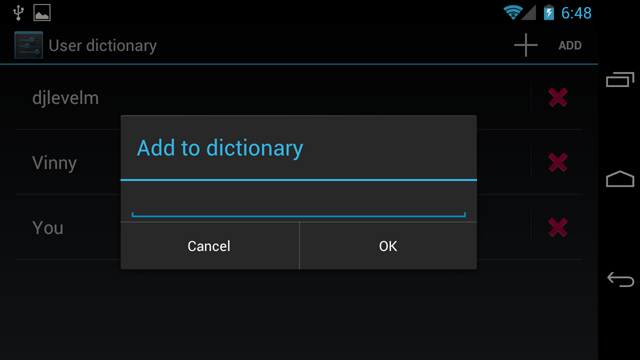
If you’re often typing odd words — such as your huggybeartoodles email moniker you’ve had since grade school — chances are, they’re not in your user dictionary. Adding words to your user dictionary allows for the word to be recognized once you’ve typed a couple letters, saving you from typing the entire thing out each time. This can both save time and avoid embarrassing auto-corrects that have your friends deleting your contact info faster than you can type an apology. Today, I’m going to show you a couple simple and easy ways to add a word to your user dictionary. Once you’ve learned these simple and easy steps, you will have an indispensable tool for increasing typing productivity while saving precious thumb energy. Below you will find instructions and a brief video on how to add a word to the user dictionary in Android.

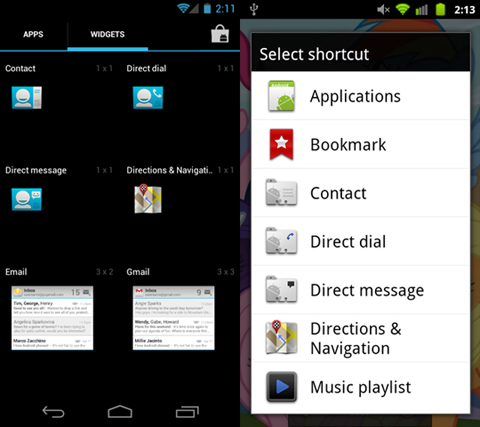
Adding shortcuts to your homescreen is one of the quintessential conveniences of owning an Android smartphone. While there are all types of shortcuts you can add, today we’re going to focus on how to add a direct dial shortcut. A direct dial shortcut is essentially an on screen speed dial icon that allows you to one-tap dial any contact you’ve specified. Adding a direct dial shortcut is an easier and faster way to call your most frequently dialed contacts. We’ve put together some simple instructions along with a short video to show you just how easy it is to add a direct dial shortcut.


