All items tagged with "how to"

Learn How You Phonecam’s Exposure System Works With This Great Infographic

New Year’s Eve, the night when alcohol-fueled confusion reigns. But unlike this self-inflicted bamboozlement, which can only be cured with time and a hearty breakfast, the confusion you feel when you start thinking about camera exposure can be fixed right now, using this excellent resource from Exposure Guide.

Read the rest of this post »

Android 4.1 Tip: How To Activate And Use Emoji (Emoticons)

Android 4.1 Tip: How To Activate And Use Emoji (Emoticons)

I’m pretty sure you’ve all used those cute little emoticons built into your messaging app, but did you know Jelly Bean has a whole slew of Emoji just waiting to be unleashed? What’s an Emoji you ask? It’s basically the Japanese equivalent of emoticons. Now I’ll admit, most of these are lame, but still, if you’re a pictograph kind of person, you’re going to at least want to know how to activate them for use.
Read the rest of this post »

Android 4.1 Tip: Identify Songs Using Google Voice Search

Android 4.1 Tip: Identify Songs Using Google Voice Search

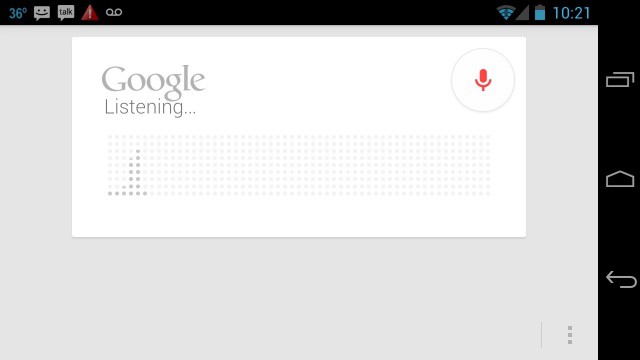
If you’ve recently updated your Google Search app for Android, you’ll notice a few great new features. One of those features is the ability to use the Song Match functionality straight from Google Search.

Read the rest of this post »

Jelly Bean Tip: Set Speech Output To Hands-Free Only

Jelly Bean Tip: Set Speech Output To Hands-Free Only

If you’re lucky enough to be running the latest version of Android (Android 4.1 Jelly Bean) then you already know how awesome improvements such as Project Butter and Google Now are. Google also made great enhancements in its Voice Search, and while it’s kind of Star Trek-ish when your device is talking back to you, it can also be annoying. Thankfully, there’s a way to disable speech output when using Voice Search — you know… for those times when your voice is the only one you feel like hearing.

Read the rest of this post »

Android 4.0+ Tip: Quick Controls And Fullscreen Mode For Your Android Browser

Android 4.0+ Tip: Quick Controls And Fullscreen Mode For Your Android Browser

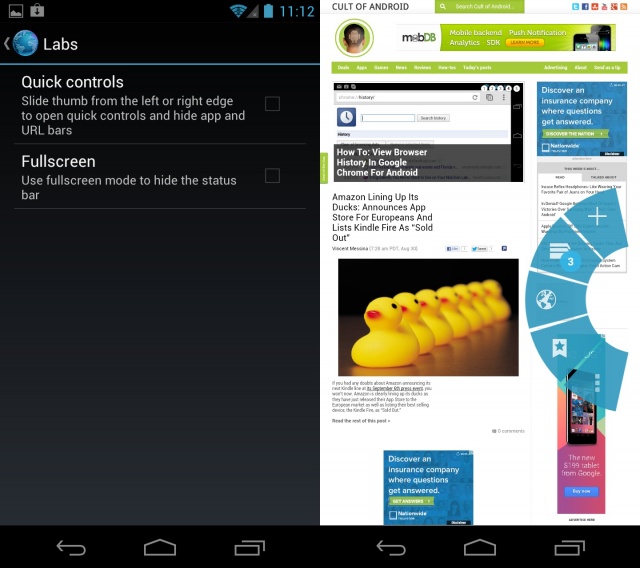
This next tip is specific to Android 4.0+ and the stock Android browser (not Chrome for Android). There are plenty of advantages and disadvantages to using the stock Android browser versus Chrome for Android. One advantage, many would argue, is the ability to use Quick controls. Quick controls for the Android browser were introduced in Android 4.0 and are exactly what the name implies — quick… controls.

Read the rest of this post »

How To: View Browser History In Google Chrome For Android

How To: View Browser History In Google Chrome For Android

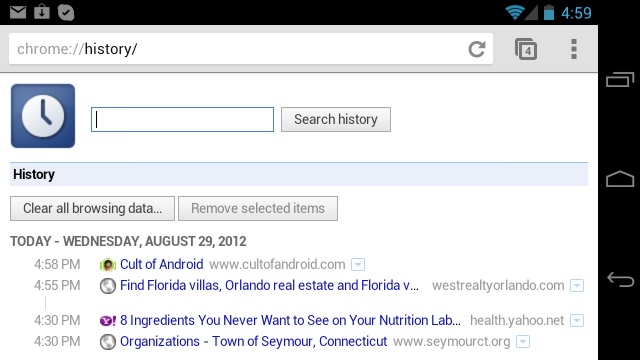
With the introduction of Google Chrome for Android, it became apparent that Google was going to replace its trusty mobile browser for the convenience of a single synced browser experience. Many Android users wondered why Chrome wasn’t the default browser to begin with, but nevertheless, they were happy to see Chrome available, and ecstatic to see it becomes the default browser with the introduction of the Nexus 7. I was one of the happy Chrome for Android adopters, and while its adoption has awarded me with numerous features, it has not been without its nuisances.

Read the rest of this post »

Announcement: Cult Of Android Teams Up With StackSocial To Bring You An All New “Deals” Hub

Announcement: Cult Of Android Teams Up With StackSocial To Bring You An All New “Deals” Hub

Cult of Android continues to grow, and as we get bigger, we want to ensure our readers have access to some of the best deals around. That’s why we’ve teamed up with the fine folks from StackSocial to bring you the new Cult of Android “Deals” Hub.

Read the rest of this post »

How To: Increase The Font Size On The Nexus 7

How To: Increase The Font Size On The Nexus 7

If you’re like me, your eyes aren’t what they used to be, and therefore you might find the font size on the Nexus 7 to be a tad tiny. Lucky for us, there’s a setting to fix that. If at any point you find the font size on your device to be too small or too big, you can head on into Settings > Display > Font size and pick from Small, Normal, Large, or Huge. Now this won’t affect every bit of text you see, so if you’re in an app that has small text, you can always try checking to see if they have their own settings.

Read the rest of this post »

How To: Toggle Screen Orientation On Your Nexus 7 Tablet

How To: Toggle Screen Orientation On Your Nexus 7 Tablet

You’ve just unwrapped your new Nexus 7 and you’re all set to start playing, when you quickly realize your screen is stuck in portrait. Now you start freaking out: “Oh no, did I get a defective Nexus 7?!” “Why won’t this thing rotate?!” “Where’s the setting to make this thing rotate?!” Calm down, take a deep breath, and exhale. Your Nexus 7 isn’t broken and you’re not doomed to spend eternity in the land of portrait.

Read the rest of this post »

Android 4.1: How Many Voice Actions Have You Tried?

Android 4.1: How Many Voice Actions Have You Tried?

Many of us are still getting acquainted with our new Android 4.1 devices (Nexus 7 in particular) so when I stumbled upon a long list of voice commands for Android 4.1, I just had to share. You may be familiar with many of the standard voice commands, but with the introduction of Google Now, there’s a whole new library of “ask and answer” commands for you to experiment with.

Read the rest of this post »