
Android 4.0 Tip: View Full Desktop Sites When Browsing The Web
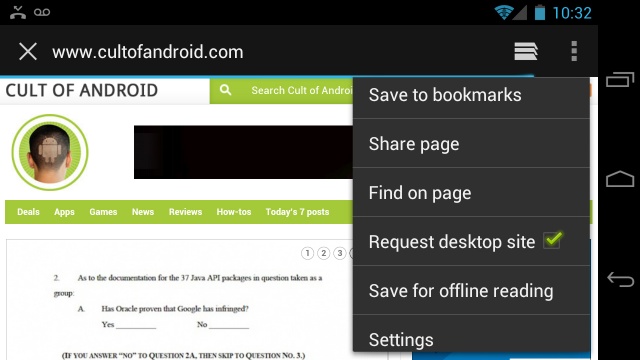
One of the most annoying things about browsing the web on a new mobile device is being forced to endure the half-baked, featureless mobile version of a website. These less intensive mobile sites weren’t a bad idea back when mobile phones were packing 500 MHz processors and 3-inch displays, but now that we have quad-core devices pushing 5-inch displays, we want the full desktop experience, none of this mini mobile mess. Thankfully in Android 4.0, you now have an easy way to request the full desktop version of a website.
If you already knew about this then there’s no need to go any further, but if you’re new to Android 4.0 or just failed to see the option, here’s how to do it:
- Open your browser
- Navigate to a website
- Press the menu icon (3 little vertical dots – if you don’t see them, swipe down on the webpage to bring down the menu bar)
- Choose “Request desktop site”
- Voila
That’s it! You can now browse the desktop version and enjoy browsing that site the way it was meant to be browsed. You’re welcome!


